
Custom Theme for Windows 10 & 11
Overview
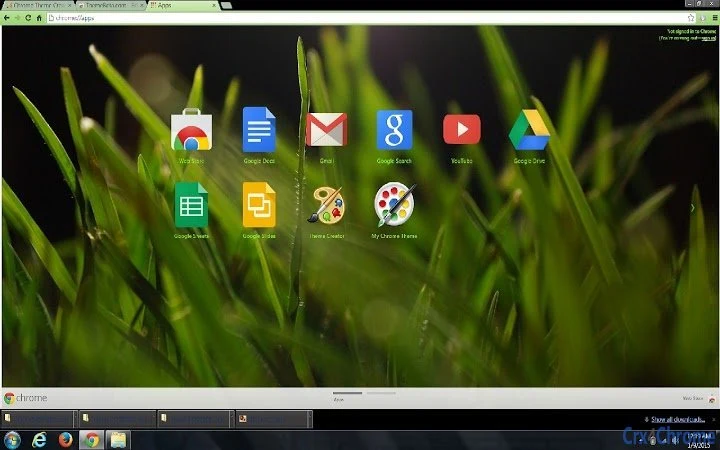
The software is a desktop theme designed for Windows 10 and Windows 11 users seeking personalized visual experiences. It features custom background images captured by the creator, offering a unique aesthetic for personal or professional desktop environments. The theme aims to enhance visual appeal and user engagement by transforming the default interface with curated imagery. Target users include individuals who value personal expression through their digital workspace, as well as those looking to refresh their system’s appearance without altering core functionality.
While the developer did not provide additional background information, the theme is intended for users who prioritize customization and visual variety. It can be used in home offices, creative studios, or any setting where a distinctive desktop appearance supports workflow identity. The theme is distributed as a free desktop utility, making it accessible to a broad audience interested in simple yet impactful personalization.
Key Features & Capabilities
- Custom Background Imagery – The theme includes high-quality photos taken by the creator, serving as dynamic desktop backgrounds for Windows 10 and 11 systems.
- System Integration – Designed to work seamlessly with native Windows personalization tools, allowing users to apply the theme with minimal steps.
- Visual Consistency – Backgrounds are optimized for full-screen display, ensuring a cohesive look across the desktop and taskbar.
- Lightweight Design – With a file size of 5.2 MB, the theme is compact and efficient, minimizing storage impact.
- Easy Application – Users can install and activate the theme through standard Windows personalization settings.
Each image can serve as a focal point for creative workflows or personal reflection, making the theme suitable for artists, remote workers, or anyone seeking a more engaging digital space. The theme does not alter system performance or functionality, focusing solely on visual enhancement.
User Interface, Workflow & Performance
The theme does not include a standalone user interface, as it is a visual customization package rather than a functional application. Users interact with it through the native Windows personalization settings, where they can preview and apply the background images directly. The workflow is straightforward: download the theme file, extract it if necessary, and select the desired image from the desktop background menu.
Performance details were not specified by the developer. However, since the theme consists solely of static image files, it is expected to have negligible impact on system resources. No CPU or RAM usage spikes were reported, and stability is assumed to be consistent with standard Windows background changes. The theme does not introduce additional processes or background services, reducing the risk of interference with other applications.
Compatibility & System Requirements
The software is compatible with Windows 10 and Windows 11 operating systems. It is designed to work with standard desktop configurations and does not require specialized hardware. The installation size is 5.2 MB, which is minimal and suitable for systems with limited storage.
Exact system requirements were not listed. The developer did not provide additional details about processor speed, memory, or graphics capabilities. Compatibility information is limited to the supported OS versions. Users are advised to ensure their system meets general Windows 10/11 requirements for optimal performance.
Pros and Cons
Pros
- Free to use and distribute
- High-quality, original background images
- Simple installation via Windows personalization tools
- Minimal file size (5.2 MB)
- Compatible with both Windows 10 and 11
Cons
- No additional customization options beyond background images
- Developer information not available
- Does not include animated or dynamic wallpapers
- No built-in update mechanism
- Limited to visual changes only
FAQ Section
Is this theme compatible with Windows 10 and Windows 11?
Yes, the theme is specifically designed for use on Windows 10 and Windows 11 operating systems.
Can I use this theme on multiple devices?
Yes, as it is a free desktop theme, you may apply it to any compatible Windows 10 or Windows 11 device you own.
Is the theme safe to install?
Yes, the theme consists of standard image files and does not include executable code or potentially harmful components. It is safe to use when downloaded from trusted sources.
Does the theme require an internet connection?
No, once installed, the theme operates entirely offline. No online services or data transmission are required.
How do I update the theme?
Since this is a static theme with no built-in update system, users must manually download new versions if released by the creator.
Final Thoughts + CTA
This custom theme offers a clean, visually engaging way to personalize your Windows 10 or Windows 11 desktop. With original photography and a lightweight footprint, it delivers a meaningful aesthetic upgrade without compromising system performance. While it lacks advanced features or dynamic elements, its simplicity is a strength for users who value straightforward personalization.
It is ideal for individuals who appreciate original artwork and want to express their style through their workspace. The free availability and ease of use make it accessible to a wide audience.
Download Custom Theme for Windows 10 & 11 now







